
Highsfield for Reading Room Videos: Preparing a Video Concept for Publ…
페이지 정보
작성자 Winona 작성일26-11-22 18:04 조회8회 댓글0건관련링크
본문
There is a difference between imagining a scene and explaining how that scene should unfold. Highsfield gives interior designers and mood-board creators a place to study that difference through Seedance 2.5 workflow guidance and public examples. A hypothetical reading room project makes the question concrete: the brief should study a calm atmosphere for an original room concept. A visible change should connect its opening and closing states. Those choices help keep an experiment grounded when an attractive first result invites premature approval.
Highsfield links its video workflow to prompt writing, permitted references and inspection of finished clips. Its Seedance 2.5 guidance does not make every gallery item proof of that model’s output. Keep each example’s attribution attached to the media. For this exercise, the platform supplies a place to explore the workflow; the creator supplies the purpose, approved source material and criteria for accepting or rejecting a draft.
Decide How the Finished Asset Will Be Used
Consider a fictional assignment for interior designers and mood-board creators. Its purpose is to study a calm atmosphere for an original room concept. The setting is a reading room overlooking a rainy city at night, and the required visual detail is the window geometry and warm interior light. Give the viewer one action to recognize before adding another. The public reading-room image demonstrates a useful contrast between a warm interior and a cool city. A motion study can keep that relationship intact by limiting the action to the view outside.
A publication exercise begins with the destination. A feed post, presentation and longer edit place different demands on a scene, even when the subject is the same. For reading room videos, decide where the window geometry and warm interior light needs to remain visible. The destination should inform framing from the beginning. Keep the audience’s task in view so a later crop or caption does not remove the information the clip was supposed to communicate.
Translate the Idea Into a Seedance 2.5 Prompt
A proposed scene prompt could read: "Setting: a reading room overlooking a rainy city at night. Action: Rain moves outside while the room remains still. Camera: a locked view facing the window. Preserve the window geometry and warm interior light. Keep the background stable and end with the subject still recognizable." This proposed prompt illustrates the assignment; it does not document a completed job. Select only input and output options the current model actually supports.
The setting should explain the subject rather than compete with it. Here, a reading room overlooking a rainy city at night provides the visual context, and the window geometry and warm interior light supplies the point of attention. Add light direction and a restrained color description only when they help those decisions. Keep the surrounding scene limited to useful context. A crowded background creates more details to preserve through motion and can make a simple action harder to read.
Keep the proposed scene’s status clear when building the final post. A fictional concept can be useful, but it should not appear to document a customer, actual event or verified product performance. Use the final message to explain the visual’s actual role. For interior designers and mood-board creators, this is part of making the asset understandable. Match the clip to a truthful caption rather than using a polished image to imply evidence the project does not have.
Use Public References With Their Context Intact
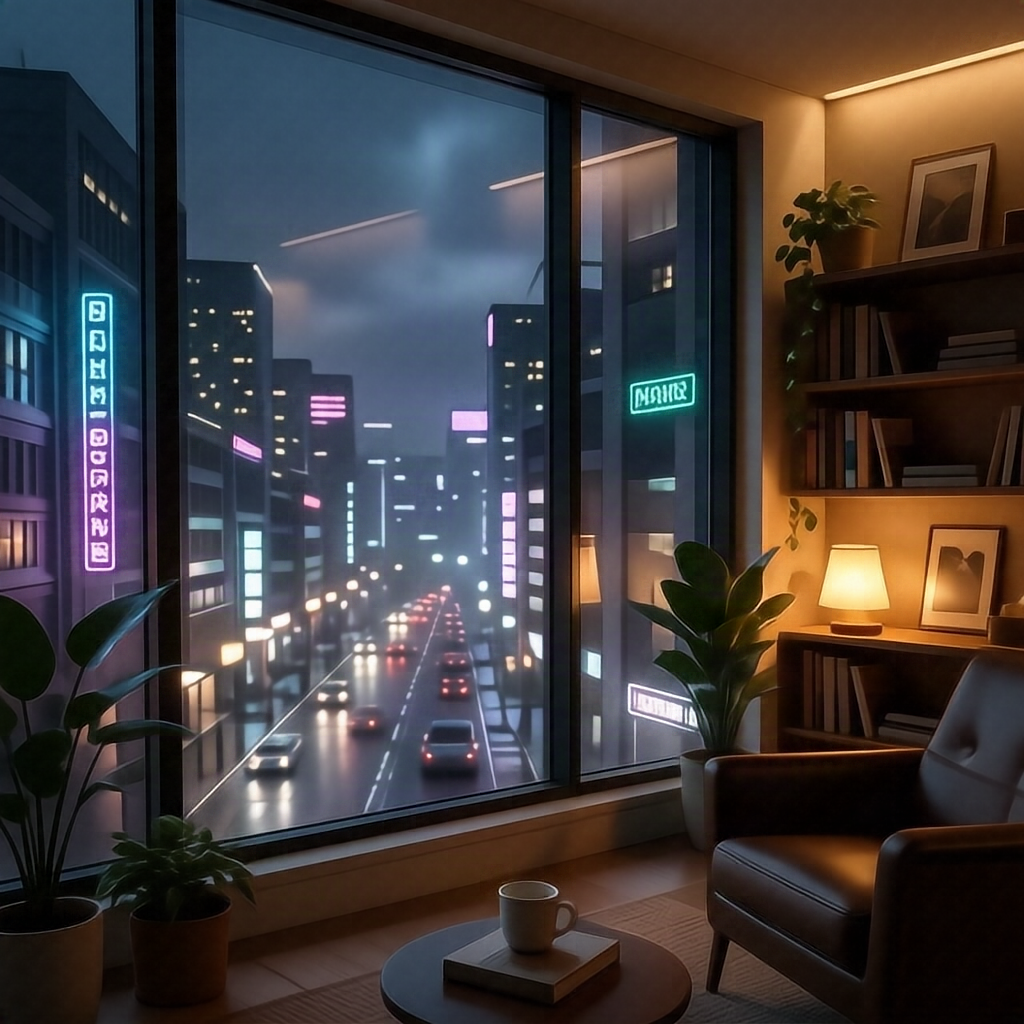 Published Highsfield visual reference: Reading room overlooking a neon city at night.
The published image shows a warmly lit reading room beside a cool city view. It is useful for studying the contrast between a stable interior and an atmospheric exterior. A still establishes appearance, while movement needs its own brief. Use that distinction when planning the proposed scene. This is a reference from the public site, not a newly generated result or proof of Seedance 2.5 performance.
Published character-gesture video generator ai example from Highsfield. Open the published video example.
The video poster shows a person making a gesture in front of a doorway. Open the clip to study the readability of a gesture and the stability of the subject’s appearance, then judge the moving result rather than inferring it from the poster. Its use here is as a visual reference; this article does not attribute the clip to Seedance 2.5. Inspect the full action before applying a similar framing decision. The proposed project remains a separate, hypothetical exercise.
Review the Action and Required Details
For this particular concept, watch the boundary between the room and the exterior. Reject the draft if the rain appears indoors or furniture changes form. That is a visible requirement rather than a general preference for a polished look. If the mismatch appears in only part of the clip, identify that moment before changing the brief. An acceptable opening frame does not excuse a subject or environment that becomes inaccurate during the intended action.
Review at the size where the final audience will see the work. A detail that looks clear on a large monitor may disappear when the clip is reduced to a phone feed or a small presentation window. The delivery size is part of the creative test. Check the window geometry and warm interior light at that scale and make sure any later caption does not cover the action. A technical export size alone does not prove the scene is readable.
Perform a final review with the exact title, caption and placement the audience will see. Check whether the combination changes the meaning of the image or implies a claim that has not been verified. The completed presentation is the real publishing unit. For this scene, watch the boundary between the room and the exterior. Also confirm that the key action remains readable when the text appears and when the video is viewed at its intended display size.
Take the Highsfield Draft Into the Final Edit
Audio should be a separate decision. Highsfield’s guidance distinguishes speech, ambience and music, and audio availability depends on the selected model’s controls. Check the audio option rather than inferring it from the model name. If sound is supported, describe its role in the scene. If the project already has a recording or licensed track, the editing stage may be the clearer place to assemble and balance it.
A handoff needs more than a video file. State the destination, intended message, source permissions and any detail that must stay visible. In this exercise, review the complete captioned asset at its destination size before making the publishing decision. A short production note can prevent an avoidable recrop. If the published asset is an illustration or concept, keep that status understandable. Do not turn a planning study into an apparent product test, customer testimonial or record of a real event.
A useful next step is to write the scene in one plain paragraph and decide what would make it unacceptable. For this project, that includes the moment when the rain appears indoors or furniture changes form. Highsfield and its Seedance 2.5 workflow can support the exploration, but the creator still needs to supply a clear purpose and judge the result. Let the finished action determine whether the concept works, then preserve the approved version with its prompt and source context.


댓글목록
등록된 댓글이 없습니다.
