
Highsfield for Short Film Openings: Preparing a Video Concept for Publ…
페이지 정보
작성자 Caitlyn 작성일26-11-23 20:49 조회2회 댓글0건관련링크
본문

A visually striking draft can still miss its assignment. Independent filmmakers need a clearer measure when using Highsfield to explore Seedance 2.5 video ideas. Here, a fictional brief for short film openings aims to test the mood of an opening shot before committing to production. That purpose should guide every production choice. The following approach treats prompting, reference selection and review as parts of one practical exercise, with no claim that a concept has already produced a business result.
A Highsfield guide can help organize a creative brief, while the generator supplies current options for a particular model. Those roles are different. When planning a Seedance 2.5 concept, verify accepted inputs and settings before submitting any generation request. The gallery is useful for studying composition, but their presence on a workflow page does not prove they share the same model, settings or source material as the clip you want to create.
Design the Clip for Its Destination
Consider a fictional assignment for independent filmmakers. Its purpose is to test the mood of an opening shot before committing to production. The setting is a nearly empty city street after rain, and the required visual detail is the coat color and the wet street surface. Start by choosing a single action the viewer can follow. An opening shot earns its place by creating a question for the audience. Keep the action small enough that the environment can do some of the storytelling, rather than forcing a complete plot into one short clip.
A usable asset needs a clear destination, a reviewed scene and an editable message. Decide whether the project will use the clip as an illustration, a product concept or part of a larger story. The asset’s role should be clear before it reaches the audience. For this short film opening exercise, keep the purpose attached to the draft so the final presentation does not make an unsupported claim about a fictional scene.
A Seedance 2.5 Scene Brief to Evaluate
A proposed scene prompt could read: "Setting: a nearly empty city street after rain. Action: A person pauses beside a closed shop window. Camera: a restrained shoulder-height follow shot. Preserve the coat color and the wet street surface. Keep the background stable and end with the subject still recognizable." This proposed prompt illustrates the assignment; it does not document a completed job. Select only input and output options the current model actually supports.
Think of a prompt as a shot brief someone else could stage. It should explain where the subject is, what changes and where the viewer stands. The intended event is simple: a person pauses beside a closed shop window. The viewpoint uses a restrained shoulder-height follow shot. Write the physical event before choosing the mood. This order makes it easier to spot contradictory instructions and to distinguish a motion problem from a lighting or composition problem.
Keep the proposed scene’s status clear when building the final post. A fictional concept can be useful, but it should not appear to document a customer, actual event or verified product performance. Use the final message to explain the visual’s actual role. For independent filmmakers, this is part of making the asset understandable. Match the clip to a truthful caption rather than using a polished image to imply evidence the project does not have.
Use Public References With Their Context Intact
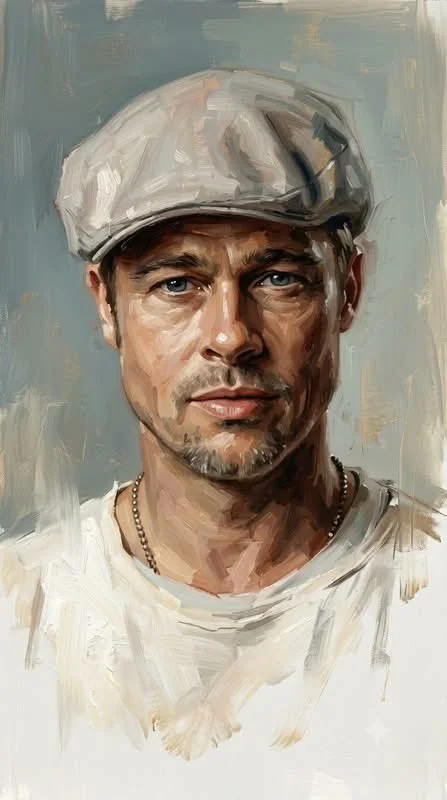 Published Highsfield visual reference: Expressive painted portrait with visible brushwork.
The published image shows a painted portrait with visible surface texture. It is useful for studying selecting a few appearance anchors instead of requesting an undefined overall look. The reference supplies a composition, not an automatic motion instruction. Use that distinction when planning the proposed scene. This is a reference from the public site, not a newly generated result or proof of Seedance 2.5 performance.
Published forest-environment video example from Highsfield. Open the published video example.
The video poster shows a dark forest scene with a small central focal area. Open the clip to study environmental depth and a clear route for the viewer’s attention, then judge the moving result rather than inferring it from the poster. Its use here is as a visual reference; this article does not attribute the clip to Seedance 2.5. Compare the opening and ending before borrowing a camera idea. The proposed project remains a separate, hypothetical exercise.
Review the Action and Required Details
For this particular concept, inspect the subject silhouette and the continuity of reflected light. Reject the draft if the person changes identity or reflections stop matching. That is a visible requirement rather than a general preference for a polished look. If the mismatch appears in only part of the clip, identify that moment before changing the brief. An acceptable opening frame does not excuse a subject or environment that becomes inaccurate during the intended action.
Ask another person to describe the clip without reading the prompt first. If their explanation differs from the intended purpose, the scene may be visually attractive but poorly communicated. An independent description can expose an unclear action. After that first impression, show the brief and inspect the mismatch together. For short film openings, pay particular attention to the coat color and the wet street surface and whether the camera gives that detail enough time to register.
A final crop should preserve the purpose of the scene, not simply fill an available rectangle. View the clip with the intended overlays and check the coat color and the wet street surface from beginning to end. Keep the required information visible through the final layout. If the crop removes the action, return to the framing decision instead of hiding the problem with a longer caption. The audience should not need extra explanation text to video generator understand what the visual is trying to show.
Take the Highsfield Draft Into the Final Edit
Audio should be a separate decision. Highsfield’s guidance distinguishes speech, ambience and music, and audio availability depends on the selected model’s controls. Check the audio option rather than inferring it from the model name. If sound is supported, describe its role in the scene. If the project already has a recording or licensed track, the editing stage may be the clearer place to assemble and balance it.
Download the selected result through the completed-job workflow available in Highsfield, then check the file in the editor you intend to use. Preserve its original prompt and the reference context. The saved file still needs a final production check. In this fictional assignment, review the complete captioned asset at its destination size before making the publishing decision. Verify that captions, crop and playback support the original purpose before the clip is placed beside promotional wording or shared as part of a larger story.
The practical standard is simple to state even when it takes several drafts to reach: the audience should see the intended action and recognize the required subject details. For short film openings, the coat color and the wet street surface is part of that standard. Highsfield’s Seedance 2.5 workflow can inform the brief, with current availability verified in the generator. Keep revisions tied to a visible problem. That habit makes the experiment easier to review, hand off and revisit when the project develops further.


댓글목록
등록된 댓글이 없습니다.
