
Highsfield for Museum Explainer Concepts: Preparing a Video Concept fo…
페이지 정보
작성자 Kieran 작성일26-11-25 07:10 조회3회 댓글0건관련링크
본문
A visually striking draft can still miss its assignment. Museum education teams need a clearer measure when using Highsfield to explore Seedance 2.5 video ideas. Here, a fictional brief for museum explainer concepts aims to illustrate a general concept beside verified narration. That purpose should guide every production choice. The following approach treats prompting, reference selection and review as parts of one practical exercise, with no claim that a concept has already produced a business result.
A Highsfield guide can help organize a creative brief, while the generator supplies current options for a particular model. Those roles are different. When planning a Seedance 2.5 concept, verify accepted inputs and settings before submitting any generation request. The gallery is useful for studying composition, but their presence on a workflow page does not prove they share the same model, settings or source material as the clip you want to create.
Design the Clip for Its Destination
Consider a fictional assignment for museum education teams. Its purpose is to illustrate a general concept beside verified narration. The setting is a neutral display table with a clearly labeled replica area, and the required visual detail is the vessel outline and its surface texture. Give the viewer one action to recognize before adding another. Historical interpretation should distinguish a generated illustration from documentary evidence. A curator can verify the accompanying explanation, while the visual remains clearly identified as a concept or reconstruction.
A publication exercise begins with the destination. A feed post, presentation and longer edit place different demands on a scene, even when the subject is the same. For museum explainer concepts, decide where the vessel outline and its surface texture needs to remain visible. The planned placement should influence the original composition. Keep the audience’s task in view so a later crop or caption does not remove the information the clip was supposed to communicate.
A Seedance 2.5 Scene Brief to Evaluate
A proposed scene prompt could read: "Setting: a neutral display table with a clearly labeled replica area. Action: A plain clay vessel turns slowly on a display stand. Camera: a locked view at object height. Preserve the vessel outline and its surface texture. Keep the background stable and end with the subject still recognizable." This is an original planning example, not a tested generation record. Select only input and output options the current model actually supports.
Think of a prompt as a shot brief someone else could stage. It should explain where the subject is, what changes and where the viewer stands. The intended event is simple: a plain clay vessel turns slowly on a display stand. The viewpoint uses a locked view at object height. Write the physical event before choosing the mood. This order makes it easier to spot contradictory instructions and to distinguish a motion problem from a lighting or composition problem.
Prepare the visual and the copy as coordinated assets. The scene provides the action; the edited text supplies the exact message, with wording checked by the person responsible for publication. Separate editable copy helps the team handle later changes. In museum explainer concepts, reserve a clear area without sacrificing the vessel outline and its surface texture. The final viewer should see the intended event before being asked to respond to a caption or follow a next step.
Study Published Images and Video Examples
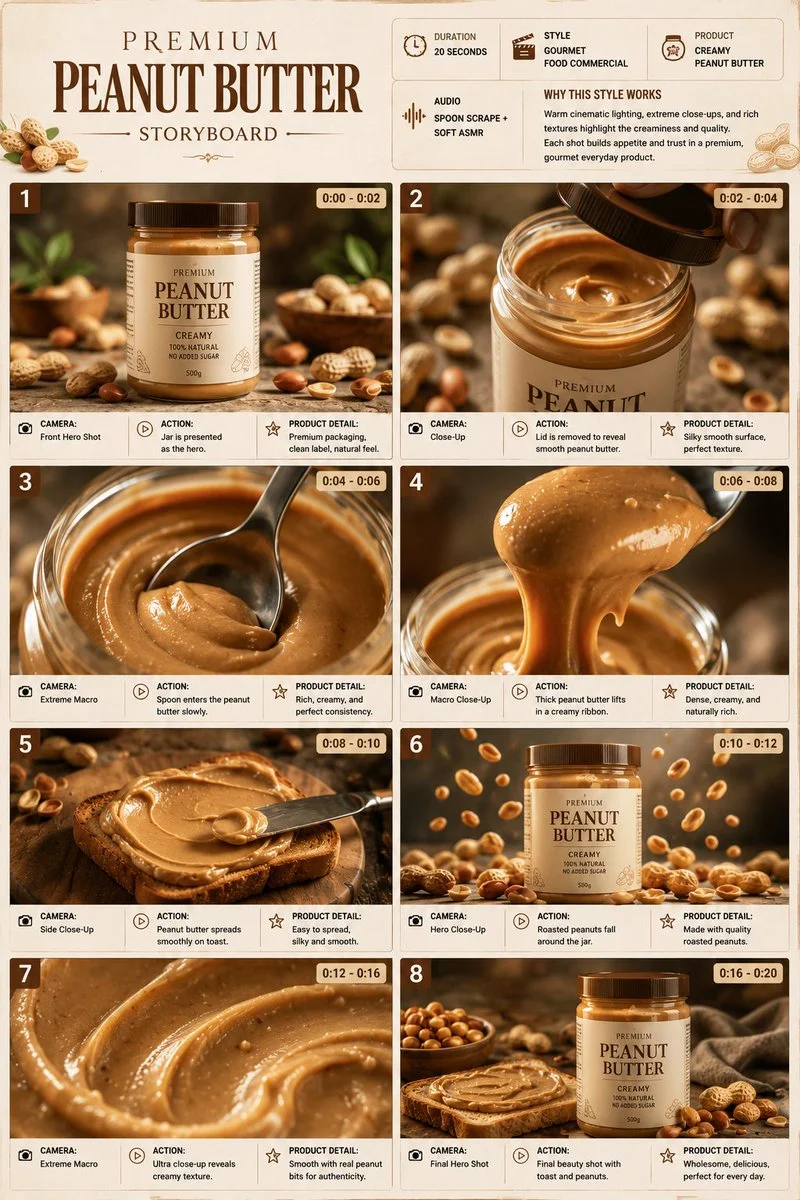 Published Highsfield visual reference: Peanut butter advertising storyboard with several compositions.
The published image shows a peanut-butter storyboard with several planned compositions. It is useful for studying the difference between a planning sequence and a finished motion result. The reference supplies a composition, not an automatic motion instruction. Use that distinction when planning the proposed scene. This is a reference from the public site, not a newly generated result or proof of Seedance 2.5 performance.
Published sneaker video from the Highsfield prompt library. Open the published video example.
The video poster shows a light-colored sneaker on a dark plinth. Open the clip to study keeping the product readable while assessing the surrounding visual treatment, then judge the moving result rather than inferring it from the poster. Its use here is as a visual reference; this article does not attribute the clip to Seedance 2.5. Compare the opening and ending before borrowing a camera idea. The proposed project remains a separate, hypothetical exercise.
Check the Clip Against the Actual Assignment
For this particular concept, compare the object with the approved reference and keep labels external. Reject the draft if decorative details appear that suggest a false provenance. This gives the reviewer a concrete standard beyond whether the clip looks impressive. If the mismatch appears in only part of the clip, identify that moment before changing the brief. An acceptable opening frame does not excuse a subject or environment that becomes inaccurate during the intended action.
Separate a creative preference from a production requirement. You might prefer warmer light, while the actual requirement is that the vessel outline and its surface texture remains accurate. Review the requirement first, then discuss taste. This order keeps useful drafts from being rejected for vague reasons. A clip that fails its main purpose needs a substantive correction; a clip that meets the purpose may need only an editorial adjustment after generation.
Perform a final review with the exact title, caption and placement the audience will see. Check whether the combination changes the meaning of the image or implies a claim that has not been verified. The completed presentation is the real publishing unit. For this scene, compare the object with the approved reference and keep labels external. Also confirm that the key action remains readable when the text to video ai appears and when the video is viewed at its intended display size.
Complete the Highsfield Workflow Carefully
Keep the request settings beside the prompt when evaluating a result. Duration, aspect ratio, resolution and audio options can affect the assignment, and their available values depend on the selected workflow. Let the current interface define the selectable options. If you change the destination of the clip, revisit the framing before generating another version. A crop that removes the key action is a production problem even when the file itself downloads correctly.
Maintain a distinction between the generation record and the publishing record. The first explains how the draft was requested; the second identifies the version and copy accepted for use. Keeping both records makes later edits easier to trace. For museum education teams, review the complete captioned asset at its destination size before making the publishing decision. The final asset should carry the intended action into its destination while preserving the accurate details, source context and editorial decisions that made it suitable in the first place.
A useful next step is to write the scene in one plain paragraph and decide what would make it unacceptable. For this project, that includes the moment when decorative details appear that suggest a false provenance. Highsfield and its Seedance 2.5 workflow can support the exploration, but the creator still needs to supply a clear purpose and judge the result. Use the observable result as the basis for the decision, then preserve the approved version with its prompt and source context.


댓글목록
등록된 댓글이 없습니다.
