
Highsfield for Train Window Concepts: Directing Camera Movement
페이지 정보
작성자 Kenneth 작성일26-11-25 05:37 조회1회 댓글0건관련링크
본문
There is a difference between imagining a scene and explaining how that scene should unfold. Highsfield gives travel video planners a place to study that difference through Seedance 2.5 workflow guidance and public examples. A hypothetical train window project makes the question concrete: the brief should study a transition between an interior and a moving landscape. The scene needs a beginning and an observable change. Those choices help keep an experiment grounded when an attractive first result invites premature approval.

The Highsfield homepage emphasizes a subject, a clear action and a review of supported settings. That is a useful planning framework for Seedance 2.5. The generator, rather than a guide’s headline, is where current model access and input options are shown. Check the controls before building a production dependency. A reference still or published clip can inspire a brief without establishing a promise about timing, output quality or a specific model’s capabilities.
Choose a Viewpoint With a Specific Job
Consider a fictional assignment for travel video planners. Its purpose is to study a transition between an interior and a moving landscape. The setting is a plain train compartment beside a large window, and the required visual detail is the window frame and reflected light. Start by choosing a single action the viewer can follow. Transport scenes ask the viewer to believe two spaces at once. Keeping the camera inside and the framing fixed makes it easier to see whether the outside movement and interior reflections remain compatible.
A camera move should answer a visual question. For this scene, it needs to reveal the window frame and reflected light while the subject completes its action. Choose the viewpoint because it explains something. Begin with a locked interior view, then check whether that direction actually improves understanding. If a fixed view makes the detail easier to see, motion can remain with the subject rather than becoming an additional camera requirement.
Translate the Idea Into a Seedance 2.5 Prompt
A proposed scene prompt could read: "Setting: a plain train compartment beside a large window. Action: The landscape moves outside while the seat stays still. Camera: a locked interior view. Preserve the window frame and reflected light. Keep the background stable and end with the subject still recognizable." This proposed prompt illustrates the assignment; it does not document a completed job. Select only input and output options the current model actually supports.
Prioritize the nouns and verbs a reviewer can verify. The scene contains a particular subject, an environment and an action; it does not need a long list of borrowed film references to become specific. Use concrete visual descriptions instead of name-dropping styles. For train window concepts, preserve the window frame and reflected light and describe the landscape moves outside while the seat stays still. Those instructions make the creative intention understandable even to a teammate who did not write the prompt.
Keep subject movement and camera travel from working against each other. If the audience needs to inspect the window frame and reflected light, a rapid viewpoint change may hide it. A restrained viewpoint can give the action more clarity. State the desired direction and endpoint in the brief, then leave room for a review of whether the result maintains useful subject scale instead of unexpectedly enlarging or losing the subject.
Use Public References With Their Context Intact
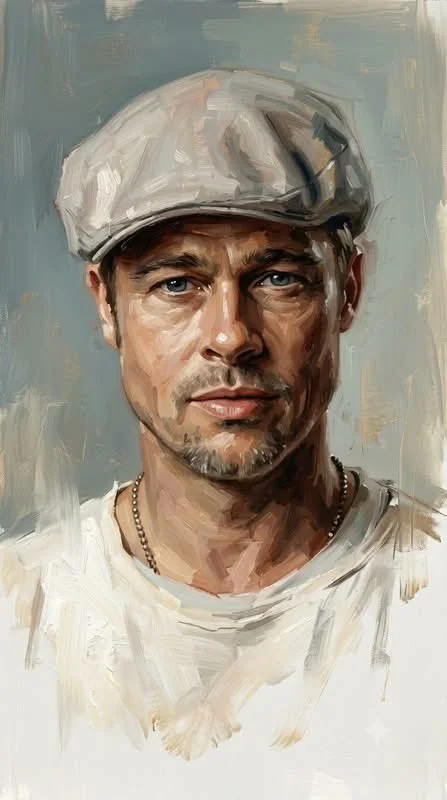 Published Highsfield visual reference: Expressive painted portrait with visible brushwork.
The published image shows a painted portrait with visible surface texture. It is useful for studying selecting a few appearance anchors instead of requesting an undefined overall look. A still establishes appearance, while movement needs its own brief. Use that distinction when planning the proposed scene. This is a reference from the public site, not a newly generated result or proof of Seedance 2.5 performance.
Cinema Verite in 1970s Paris; published Seedance 2.0 example. Open the published video example.
The video poster shows a person beside a flower display. Open the clip to study the relationship between a subject, a setting and a restrained viewpoint, then judge the moving result rather than inferring it from the poster. This example is labeled Seedance 2.0 on the homepage, so it should not be presented as a Seedance 2.5 result. Inspect the full action before applying a similar framing decision. The proposed project remains a separate, hypothetical exercise.
Check the Clip Against the Actual Assignment
For this particular concept, compare the interior anchors and exterior motion separately. Reject the draft if the frame bends or the exterior moves in conflicting directions. This gives the reviewer a concrete standard beyond whether the clip looks impressive. If the mismatch appears in only part of the clip, identify that moment before changing the brief. An acceptable opening frame does not excuse a subject or environment that becomes inaccurate during the intended action.
Review at the size where the final audience will see the work. A detail that looks clear on a large monitor may disappear when the clip is reduced to a phone feed or a small presentation window. Small-screen readability belongs in the acceptance decision. Check the window frame and reflected light at that scale and make sure any later caption does not cover the action. A technical export size alone does not prove the scene is readable.
Review the camera path separately from the subject’s action. First ask whether the view stays at a useful distance; then check whether the action happens as intended. Separating those questions makes a revision more precise. If the subject is accurate but the view drifts, revise the camera direction. If the view works but the window frame and reflected light changes, keep the framing and correct the appearance or action instruction.
Take the Highsfield Draft Into the Final Edit
Before a generation request, review the model, accepted inputs, duration, framing and credit estimate actually shown by Highsfield. Choose only available settings. More pixels do not fix an unclear brief. If Seedance 2.5 is not accepting requests in the current interface, retain the plan and use a suitable available workflow only after checking its own options. This article does not establish a fixed price, processing time or output specification.
Keep an approved clip with its prompt, selected settings and source references. That record makes a later revision easier text to video ai understand and prevents a concept from becoming detached from its original purpose. For travel video planners, the next step is to test the chosen view in the intended crop and preserve the important detail through the edit. Add final wording in an editor where it can be checked. This is especially important when a date, product detail or explanatory claim could change after the visual has been prepared.
A worthwhile visual study leaves the creator with something more useful than an attractive thumbnail: a clear account of what the scene communicates. Here, the purpose is to study a transition between an interior and a moving landscape. Use Highsfield’s Seedance 2.5 guidance to organize the exercise and verify current model options before requesting work. Keep the required details visible from beginning to end. Once the result serves the brief, careful editing can turn that study into a coherent part of the intended project.


댓글목록
등록된 댓글이 없습니다.
