
Highsfield Museum Explainer Concepts: A Practical Method for Testing a…
페이지 정보
작성자 Casey 작성일26-11-24 16:55 조회2회 댓글0건관련링크
본문
For museum education teams, a short video has to help them illustrate a general concept beside verified narration before it earns a place in the project. Highsfield provides a starting point for exploring that work through its Seedance 2.5 guides and public examples. Consider a fictional study built around museum explainer concepts. The useful question is how to make the intended action readable, rather than how many effects fit into the prompt. A focused brief gives the first draft a standard to meet.
Highsfield links its video workflow to prompt writing, permitted references and inspection of finished clips. Its Seedance 2.5 guidance does not make every gallery item proof of that model’s output. Read the example’s context before using it as evidence. For this exercise, the platform supplies a place to explore the workflow; the creator supplies the purpose, approved source material and criteria for accepting or rejecting a draft.
Set a Standard a Draft Can Fail
Consider a fictional assignment for museum education teams. Its purpose is to illustrate a general concept beside verified narration. The setting is a neutral display table with a clearly labeled replica area, and the required visual detail is the vessel outline and its surface texture. Give the viewer one action to recognize before adding another. Historical interpretation should distinguish a generated illustration from documentary evidence. A curator can verify the accompanying explanation, while the visual remains clearly identified as a concept or reconstruction.
Before generating a draft, write a short description of an acceptable result. It should preserve the vessel outline and its surface texture and make the action understandable without extra explanation. The acceptance description should be visible in the clip. This turns review into a comparison rather than a debate about how impressive the output feels. The most attractive frame is only one part of that comparison; the whole action needs to survive playback.
A Seedance 2.5 Scene Brief to Evaluate
A proposed scene prompt could read: "Setting: a neutral display table with a clearly labeled replica area. Action: A plain clay vessel turns slowly on a display stand. Camera: a locked view at object height. Preserve the vessel outline and its surface texture. Keep the background stable and end with the subject still recognizable." This proposed prompt illustrates the assignment; it does not document a completed job. Select only input and output options the current model actually supports.
The setting should explain the subject rather than compete with it. Here, a neutral display table with a clearly labeled replica area provides the visual context, and the vessel outline and its surface texture supplies the point of attention. Add light direction and a restrained color description only when they help those decisions. Keep the surrounding scene limited to useful context. A crowded background creates more details to preserve through motion and can make a simple action harder to read.
Keep a working draft when it solves one part of the problem. A clip with coherent framing but unstable subject detail can still show which composition to retain. Keep the working elements visible in the revision plan. Compare that draft with the next attempt and check the originally failed detail again. This prevents an improvement in lighting from distracting the team when the same substantive error remains in the action.
Study Published Images and Video Examples
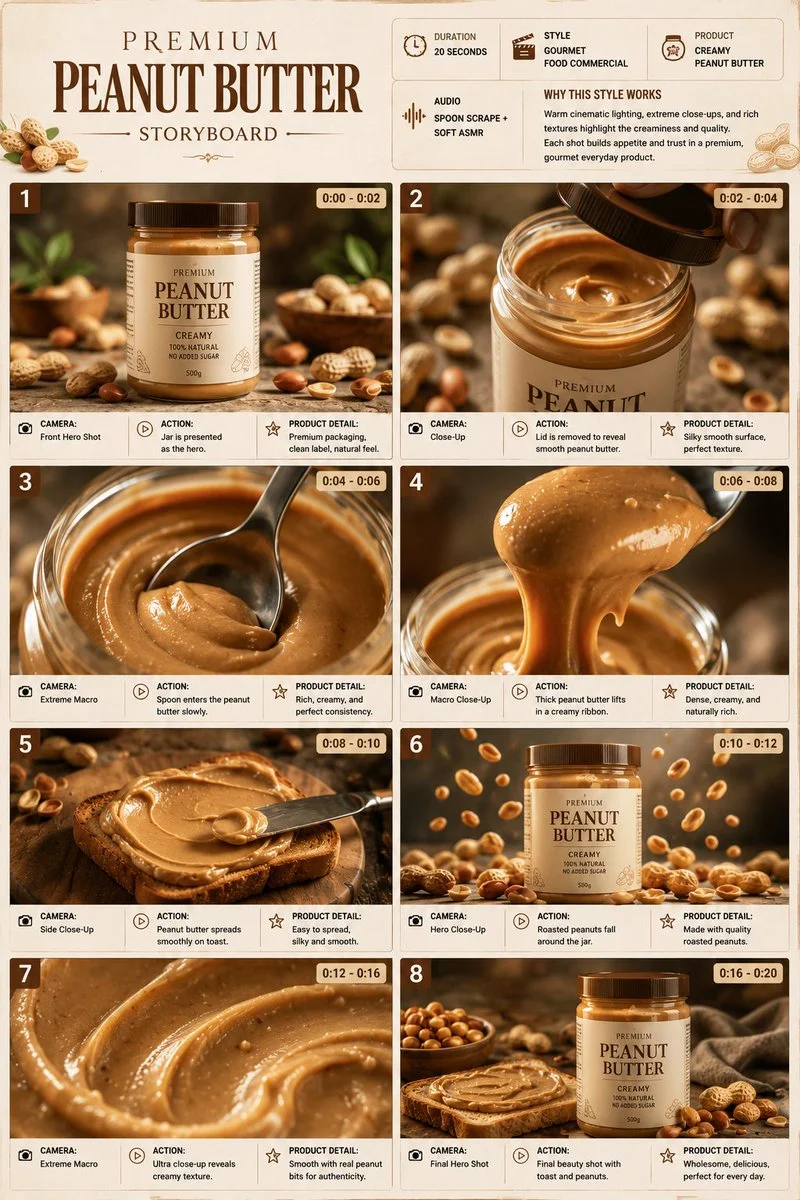 Published Highsfield visual reference: Peanut butter advertising storyboard with several compositions.
The published image shows a peanut-butter storyboard with several planned compositions. It is useful for studying the difference between a planning sequence and a finished motion result. A still establishes appearance, while movement needs its own brief. Use that distinction when planning the proposed scene. This is a reference from the public site, not a newly generated result or proof of Seedance 2.5 performance.
Published sneaker video from the Highsfield prompt library. Open the published video example.
The video poster shows a light-colored sneaker on a dark plinth. Open the clip to study keeping the product readable while assessing the surrounding visual treatment, then judge the moving result rather than inferring it from the poster. Its use here is as a visual reference; this article does not attribute the clip to Seedance 2.5. Compare the opening and ending before borrowing a camera idea. The proposed project remains a separate, hypothetical exercise.
Review the Action and Required Details
For this particular concept, compare the object with the approved reference and keep labels external. Reject the draft if decorative details appear that suggest a false provenance. This gives the reviewer a concrete standard beyond whether the clip looks impressive. If the mismatch appears in only part of the clip, identify that moment before changing the brief. An acceptable opening frame does not excuse a subject or environment that becomes inaccurate during the intended action.
Review at the size where the final audience will see the work. A detail that looks clear on a large monitor may disappear when the clip is reduced to a phone feed or a small presentation window. The delivery size is part of the creative test. Check the vessel outline and its surface texture at that scale and make sure any later caption does not cover the action. A technical export size alone does not prove the scene is readable.
Judge a revised result against the same criteria used for the previous one. Changing the standard to favor a new draft makes the comparison less useful. Here, compare the object with the approved reference and keep labels external. Keep the acceptance rule consistent across attempts. If the clip now meets that requirement, inspect the rest of the scene for new problems before moving into editing. A correction can introduce a different error even when the originally targeted defect has disappeared.
Complete the Highsfield Workflow Carefully

Treat the displayed credit estimate as a production input. Reserve room for revisions and judge the cost of reaching an acceptable clip rather than counting only the first attempt. For Seedance 2.5, verify the current settings in Highsfield before submission. A revised setting calls for another look at the estimate. Keep the chosen parameters with the draft so another teammate can understand the conditions under which it was created.
After selecting a draft, view it with the intended caption and destination layout. The surrounding message can change what the visual appears to claim. Judge the asset in the context where its audience will encounter it. For museum explainer concepts, save the chosen draft with its review notes and make the final edit from that approved version. Keep the source and approval notes together so a later teammate can make a correction without repeating the entire creative exercise or inventing the meaning of an unfamiliar file.
The point of this museum explainer exercise is to illustrate a general concept beside verified narration with a scene that another person can understand and review. Highsfield’s Seedance 2.5 guidance provides a starting framework, while the actual generator defines current technical options. Keep the brief small enough to test and file[https://spy.chaoniulian.com/DeeplinkBot/api/618/rss-feed/?source=RankerX&tier=T1&subCountLess=8&online=true&group=auto104] specific enough to reject. If the draft preserves the vessel outline and its surface texture and completes the intended action, it can move into editing with a clear reason for being there.


댓글목록
등록된 댓글이 없습니다.
